网络工程师知识图谱(Cisco) 第一章 网络部分 I. 交换部分 一、基础配置 一些交换机的基础配置代码如下,主要包含在特权模式下的查看、清空等命令。
1
2
3
4
5
6
7
8
9
10
11
12
13
14
15
16
17
进入特权模式:en 进入全局模式:configure terminal 改名(全局模式):hostname SW1 设置进入交换机特权模式的密码(全局模式):enable password 123123(running-config中显示明文) enable secret 123123(running-config中显示密文) 设置console线接入交换机密码(全局模式):line console 0; password 123123; login 查看接口信息:show ip int brief/show int g0/0 switchport 查看当前运行的配置:show running-config 查看系统版本:show version 查看交换机Vlan:show vlan brief 检查trunk链路是否建立成功:show int trunk 查看mac地址表:show mac address-table 清空mac地址表:clear mac address-table dynamic 查看mac地址老化时间:show mac address-table aging-time 查看生成树:show spanning-tree
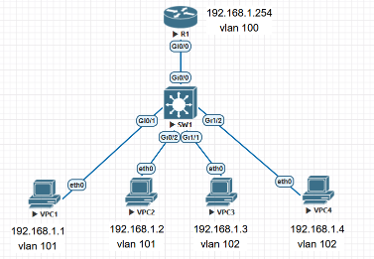
二、vlan技术 1. vlan配置 为了缩小广播范围,隔离广播域/网段而设计的技术。
1
2
3
4
vlan 10 interface g0/0 switchport mode access switchport access vlan 10
1
2
3
4
5
vlan 20 interface g0/1 switchport trunk encapsulation dot1q //指定封装协议为802.1Q而非ISL switchport mode trunk switchport trunk allowed vlan 20
1
2
3
show vlan show vlan brief show interfaces trunk
2. 本征Vlan和邻居发现 1 2 3 4 native vlan 10 //两端都需要配置 # show cdp neighbors # show lldp neighbors lldp run
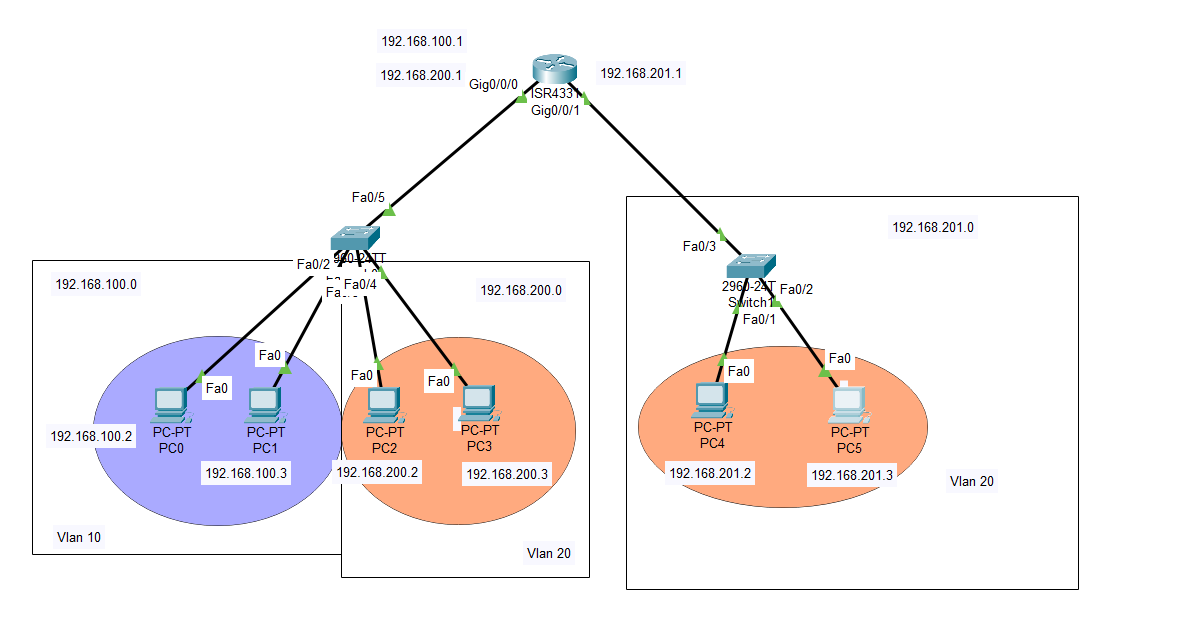
3. vlan间通信-单臂路由
4. 链路聚合配置 1 2 3 4 5 6 7 8 9 10 11 12 13 14 15 16 17 18 19 #配置(全局模式) interface range g0/1-2 switchport trunk encapsulation dot1q switchport mode trunk shutdown channel-protocol lacp channel-group 1 mode active no shutdown #查看配置(特权模式) show etherchannel summary #取消配置(全局模式) no channel-protocol lacp no interface port-channel 1 interface range g0/1-2 no channel-group 1 mode active #exit出接口,恢复接口默认值 default interface range g0/1-2
5. Private Vlan配置
1 2 3 4 5 6 7 8 9 10 11 12 13 14 15 16 17 18 19 20 21 22 23 24 vtp mode transparent Vlan 201 private-vlan isolated vlan 202 private-vlan community vlan 100 private-vlan primary private-vlan association 201,202 int g0/1 switchport mode private-vlan promiscuous switchport private-vlan mapping 100 201,202 #100是主Vlan,此处配置交换机上行端口 int g0/2 switchport mode private-vlan host switchport private-vlan host-association 100 201 #100是主Vlan,201是关联度的隔离Vlan,此处配置交换机下行端口 int g0/3 switchport mode private-vlan host switchport private-vlan host-association 100 202 #100是主Vlan,202是关联度的隔离Vlan,此处配置交换机下行端口 #验证命令 show vlan private-vlan
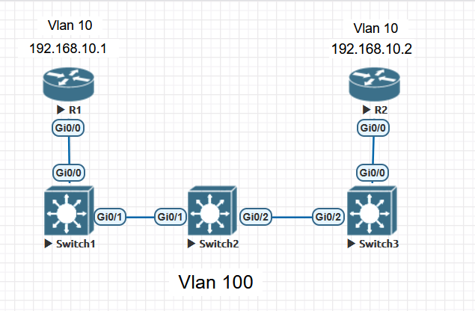
6. QinQ配置
1 2 3 4 5 6 7 8 9 10 11 12 13 14 15 16 17 18 19 20 21 22 23 24 25 26 27 28 29 30 31 32 33 34 35 36 37 38 39 40 41 42 43 44 45 #CE-1 路由器R1开启子接口 int g0/0 no shutdown int g0/0.10 encapsulation dot1q 10 ip address 192.168.10.1 255.255.255.0 no shutdown #PE-1 SW1配置(SW3镜像类比) vtp mode transparent vlan 100 name ISP_Outer_vlan int g0/0 description Connect_to_CE-1 #类似于注释 switchport mode dotq1-tunnel #access接口 switchport access vlan 100 no shutdown int g0/1 description Connect_to_P #类似于注释 switchport trunk encapsulation dot1q switchport mode trunk #trunk接口 switchport trunk allowed vlan 100 no shutdown #P SW2配置 vtp mode transparent vlan 100 name ISP_Outer_vlan int g0/1 description Connect_to_PE-1 #类似于注释 switchport trunk encapsulation dot1q switchport mode trunk #trunk接口 switchport trunk allowed vlan 100 int g0/2 description Connect_to_PE-2 #类似于注释 switchport trunk encapsulation dot1q switchport mode trunk #trunk接口 switchport trunk allowed vlan 100
三、STP技术 四、端口安全技术 1 2 3 4 5 6 7 8 9 10 11 12 13 14 15 16 17 18 19 20 21 22 23 24 25 #端口安全设置(Port-Security):在接入层交换机上配置端口安全,防止 MAC 地址泛洪攻击。 int g0/0 switchport port-security switchport port-security maximum 2 #最大可接入mac地址 switchport port-security mac-address sticky #学习方式:交换机主动学习连接它的端口的设备的mac地址,并将他加入到mac-address table中 switchport port-security violation restrict #触发违规后的操作,报错但不影响现网流量转发 #DHCP嗅探:防止伪造 DHCP 服务器攻击。 ip dhcp snooping #全局开启 ip dhcp snooping vlan 10 #在Vlan 10上开启 interface Ethernet 0/1 # 接入层交换机上联 SW1 的骨干口配置为 Trust ip dhcp snooping trust interface Ethernet 0/0 # 边缘终端接口配置速率限制10 pps ip dhcp snooping limit rate 10 #Dynamic ARP Inspection(DAI)防止 ARP 欺骗攻击。 ip arp inspection vlan 10 ip arp inspection validate src-mac dst-mac ip #启用 ARP 验证:src-mac、dst-mac、ip interface Ethernet 0/0 #上联/连接服务器信任口配置为 Trust ip arp inspection trust #IP Source Guard(IPSG)防止 IP 地址欺骗。 interface Ethernet 0/0 ip verify source tracking port-security #基于 IP + MAC 地址进行过滤
II. 路由部分 一、基础配置 小白必看:
涉及不同网段的转发,需要在终端处设置网关地址;
路由器默认接口关闭,需要进入接口后no shutdown;
路由器需要进入接口后配置ip地址(带网关的配置:ip address 192.168.1.2 255.255.255.0 192.168.1.1);
跨网段通信,ip地址不转换,mac目标地址会转换成路由器(网关)地址;
静态路由要多端一起配置,且需要一来一回都配置。写法:ip route 192.168.1.0 255.255.255.0 12.1.1.2(目标地址要和掩码匹配,做与运算后的数放到目标地址的最后一部分)。
Windows默认开启防火墙,它允许自己发出的任何协议包返回,但不允许其他设备向自己发送任何协议包(表现为“超时”,而如果没开防火墙+端口无服务表现为“拒绝”)。
一些路由器的基础配置代码如下:
1
2
3
4
5
6
查看路由表:show ip route 查看邻居:show cdp neighbors 查看OSPF邻居:show ip ospf neighbors 查看OSPF接口:show ip ospf int g0/1 查看OSPF状态数据库(LSDB):show ip ospf database
二、路由协议之-OSPF 1 2 3 4 5 #OSPF写法 router ospf 1 router-id 1.1.1.1 network 12.1.12.0 0.0.0.255 area 0 //通告所有相连的网段,反掩码
三、路由协议之-EIGRP 四、路由协议之-BGP 1 2 3 4 5 6 7 8 9 10 11 12 13 14 15 16 #BGP写法 router bgp 100 bgp router-id 1.1.1.1 neighbor 2.2.2.2 remote-as 200 neighbor 2.2.2.2 update-source lo0 //使用环回接口建立ibgp邻居时使用 neighbor 12.1.1.2 ebgp-multihop 2 //建立ebgp邻居时使用多跳避免ttl耗尽 neighbor 2.2.2.2 next-hop-self //下一跳自我 #RR路由反射器 #联邦 #IPV6+BGP
五、路由策略和路由控制 1. 前缀列表 2. 路由策略 3. 路由重分布 六、MPLS 七、IPsec III. 服务与控制部分 一、ACL 配置方式有access-list和ip access-list两种,但前者只可以根据编号区分ACL,后者可以用编号/名称来区分ACL。
1. 标准ACL(Standard ACL)
2. 扩展ACL(Extended ACL)
思科编号范围在100-199;
增加由哪个主机到哪个主机通信、协议的筛选;
配置代码,以ip access-list为例:
1 2 3 4 5 6 路由器写ACL: ip access-list extended MCD 1 deny tcp any any eq 134 #拒绝端口为134的tcp协议 2 permit ip host 192.168.8.9 host 192.168.13.2 3 permit ip any any
二、Telnet 远程连接设备,但是明文传输不建议使用。配置代码:
1 2 3 4 5 line vty 0 4 password cisco login transport input telnet
三、SSH 远程连接设备,密文传输建议使用。配置代码:
1 2 3 4 5 6 7 8 9 10 hostname R1 ip domain-name cisco.com crypto key generate rsa modulus 2048 username admin privilege 15 password cisco line vty 0 4 login local transport input ssh
四、DHCP 1 2 3 4 5 6 7 8 9 10 11 12 13 14 15 16 17 18 19 20 21 22 23 24 25 26 27 28 29 30 #在交换机上开启三层理由功能,SVI接口 ip routing int vlan 10 ip address 192.168.20.254 255.255.255.0 #网关地址 no shutdown #DHCP中继 ip helper-address 192.168.20.253(DHCP服务器地址) #DHCP服务器上 ip dhcp excluded-address 192.168.10.100 192.168.10.110 #排除这些地址不分配 ip dhcp pool CCNP network 192.168.10.0 255.255.255.0 default-router 192.168.20.254 #网关地址 dns-server 8.8.8.8 lease 2 #让PC1始终获得固定地址192.168.10.152 #先拿到PC1的MAC地址 ip dhcp pool PC1_STATIC_IP host 192.168.10.150 255.255.255.0 client-identifier 01XX.XXXX.XXXX.XX(XX为MAC地址) default-router 192.168.10.254 dns-server 8.8.8.8 #查看命令 show ip dhcp pool show ip dhcp binding #查看内网哪些IP已经分配给哪个MAC地址 show ip dhcp server statistics #查看客户端和服务器之间DORA报文的收发总数
五、NAT/PAT
做内网映射外网时,想要测试是否映射成功,需要从外网拉主机测试,否则会让同网段路由器回包时不经过NAT转换而直接发送内网地址,导致主机收到的回包IP对不上丢包。
六、SD-WAN 第二章 Linux 第三章 Python与自动化